Shopify merchants should not need Google Analytics just to understand how people find and use their store.
Shopify Analytics is a capable commerce reporting system. It connects traffic to products, orders and revenue inside Shopify. Plausible solves a different problem: simple, privacy-first web analytics without cookies, personal data or the complexity of the Google Analytics model.
For most merchants, the practical setup is Shopify Analytics for commerce and Plausible for website traffic, campaigns and conversions. GA4 is mainly worth the additional complexity when your reporting depends heavily on the Google advertising ecosystem or advanced custom explorations.
- The short answer: Shopify for commerce, Plausible for web analytics
- Shopify Analytics: the built-in reporting system
- What Shopify Analytics does not replace
- Google Analytics 4 for Shopify
- Plausible Analytics for Shopify
- Frequently asked questions
- Conclusion
The short answer: Shopify for commerce, Plausible for web analytics
| What you need to understand | Best fit | Why |
|---|---|---|
| Products, orders, margins and store operations | Shopify Analytics | It is built into Shopify and connected directly to your commerce data. |
| Traffic, campaigns and conversions without cookies | Plausible Analytics | It replaces Google Analytics with a simple dashboard and privacy-first measurement. |
| Detailed custom event analysis tied to Google Ads | Google Analytics 4 | It provides flexible explorations and deep integration with Google’s advertising products. |
Shopify and Plausible are complementary. You can keep Shopify as the source of truth for orders while Plausible shows which sources, campaigns and landing pages brought people to your store. Plausible can also cover a separate blog or other domains, so your web analytics are not locked to one ecommerce platform.
Understand Shopify traffic, campaigns and revenue without Google Analytics
Shopify Analytics: the built-in reporting system
The first option is the reporting system built into Shopify itself. It’s available right in your Shopify account, accessible from the admin sidebar under “Analytics.”
It gives merchants a quick overview of store performance. Reports cover sales, customer behavior, finances and more without any setup required.
Shopify says the main Analytics features are available on every subscription plan.
Shopify Analytics has three main components: an Overview dashboard, detailed reports and a live view.
Types of reporting in Shopify
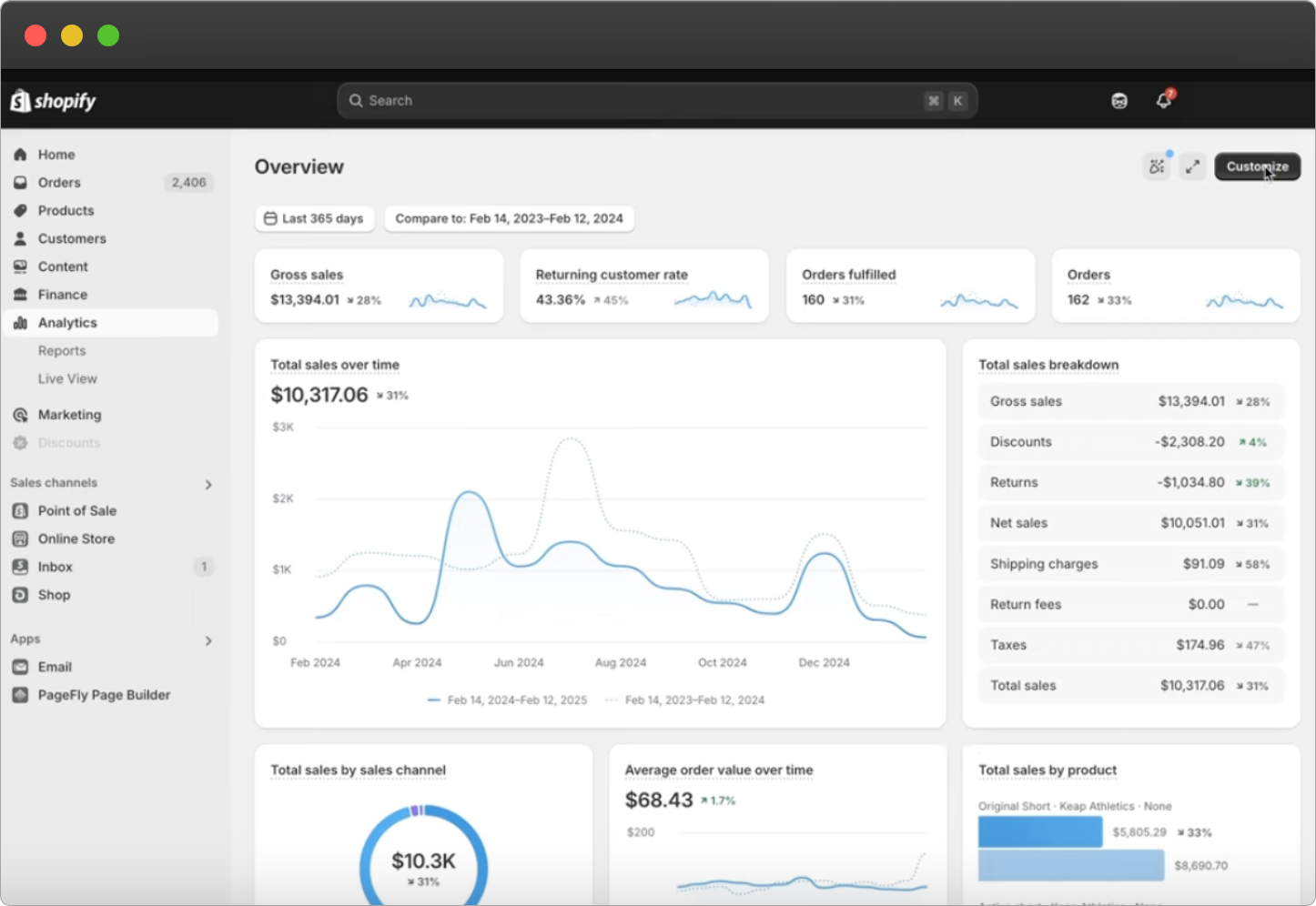
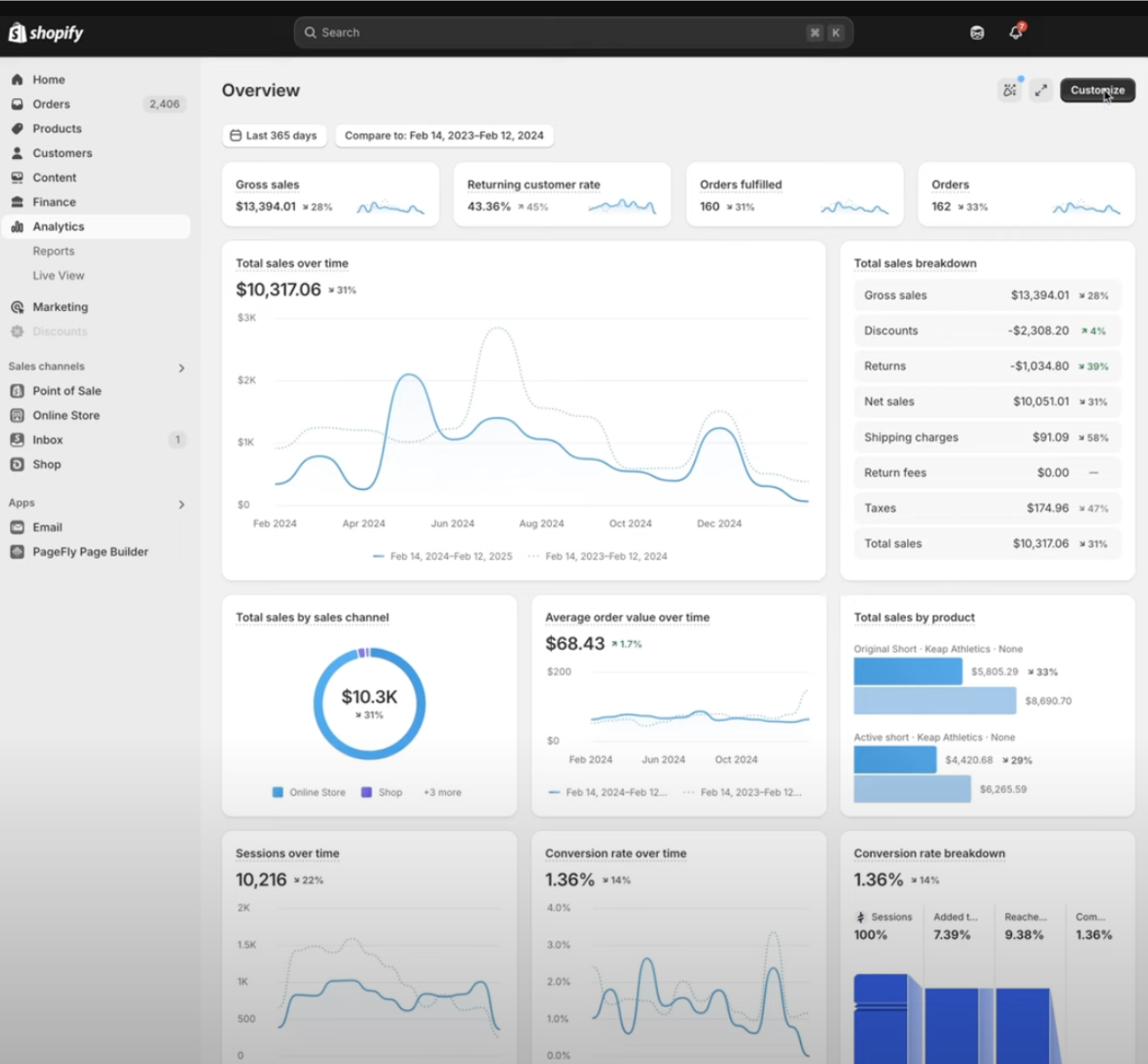
Overview dashboard
This is the first thing you see when you open Analytics. It shows your most important ecommerce metrics at a glance: sales, orders, conversion rate and more.
It’s a collection of data cards with summary numbers and trend graphs. You can customize which metrics appear on desktop, select date ranges, compare against previous periods and click any card to open the corresponding detailed report.
Reports
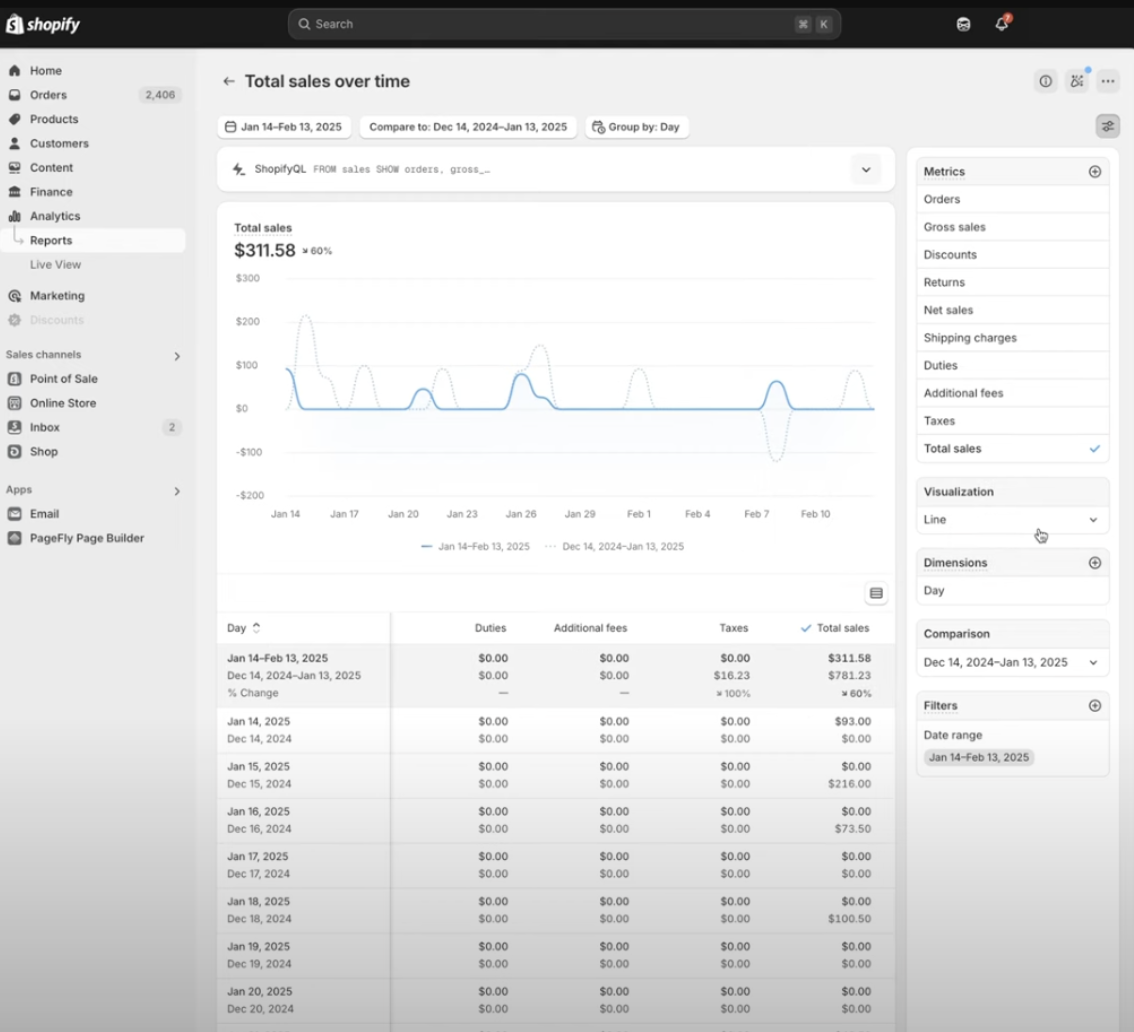
Shopify’s full reports library is accessible from the sidebar. Reports are divided into categories like Finances, Acquisition and Behavior. Each includes a graph and data table you can filter and segment.
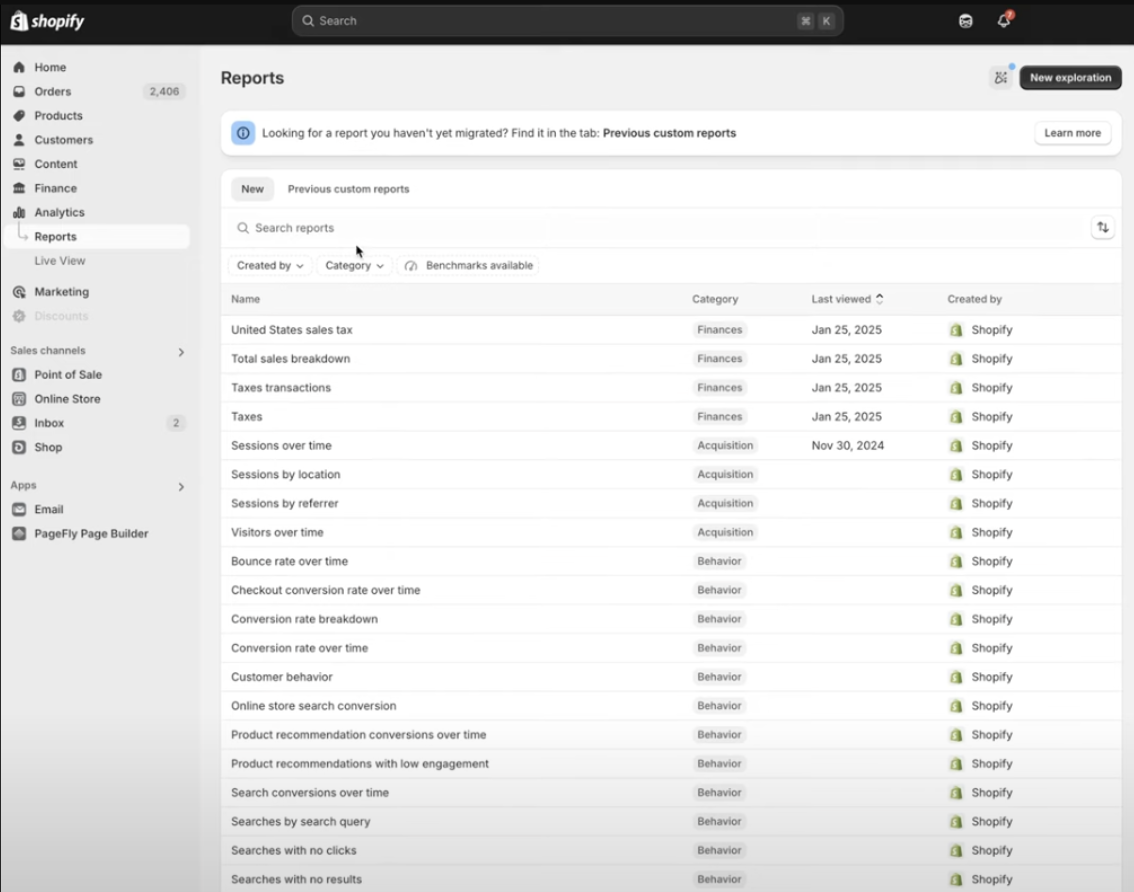
The default report categories:
Acquisition reports: Sessions and visitors by source, location and referring site.
Behavior reports: How customers browse and shop your store.
Customers reports: Customer location, returning customers, one-time customers and cohort analysis.
Finance reports: Sales summary, taxes, gift cards, liabilities and store credit transactions.
Fraud reports: Chargeback rates and high-risk orders.
Inventory reports: Stock levels, inventory movements and product availability.
Marketing reports: Sessions and sales attributed to marketing activity.
Order reports: Order trends, fulfillment status and return rates.
Profit reports: Gross margins, cost of goods sold and net profit by product and channel.
Retail sales reports: In-person sales, staff contributions and product performance at retail locations.
Sales reports: Total sales, sales by product or channel and average order values.
You can customize a report as a data exploration and save the result for later use.
Live View
Live View shows what’s happening on your store right now: current visitor count, locations, active actions and any live sales or checkouts. Most useful during flash sales or product launches.
Key metrics in Shopify Analytics
Here are the metrics you’ll see most often across the Overview dashboard and reports.
Total Sales: Revenue earned in the selected period after all adjustments. In Shopify, Total Sales is net sales plus taxes, shipping and duties. It’s the bottom-line number.
Gross Sales: All items sold at full price, before discounts, returns or other deductions. Useful for understanding pre-discount demand.
Net Sales: Gross Sales minus discounts and returns. Excludes taxes and shipping fees.
Total Orders: Count of orders placed in the period, across all sales channels. Each order is counted once regardless of how many items are in it.
Online Store Sessions: The number of visits to your store. One person can generate multiple sessions by returning later, so sessions are always higher than unique visitors.
Conversion Rate: Orders divided by sessions, expressed as a percentage. The Overview dashboard also breaks this into a funnel showing cart adds, checkout starts and completed purchases, so you can see where customers drop off.
Average Order Value (AOV): Total revenue divided by total orders. If you had $1,000 from 20 orders, your AOV is $50.
Returning Customer Rate: Percentage of customers who have placed more than one order. A measure of loyalty and retention.
Return Rate: Percentage of items sold that were later returned.
What Shopify Analytics does not replace
Shopify has expanded its analytics considerably. Its current reports cover sales, sessions, bounce rate, average session duration, landing pages, campaigns and more. The reason to add Plausible is not that Shopify lacks every web metric.
Independent analytics beyond Shopify
Shopify Analytics is built around your Shopify store and its data model. Plausible gives you one web analytics view across the storefront, a separate content site and other domains. If you later change ecommerce platforms, your Plausible history and campaign setup stay with you.
Traffic measurement without analytics cookies
Shopify’s own analytics field reference says online store sessions are counted when visitors consent to cookies through your banner. That limitation applies to its browser-based traffic measurement, not to the orders Shopify records as an ecommerce platform.
Plausible does not use cookies or collect personal data. It can measure the traffic and conversions it receives without waiting for analytics consent. Other tools on your Shopify store may still require a banner, so review the complete setup rather than assuming one analytics change removes every consent requirement.
A focused alternative to the Google Analytics model
Shopify reports are increasingly capable, but adding more reports is not the same as making analytics simpler. Plausible keeps the common website questions in one place: where visitors came from, which pages they entered through and which campaigns or pages produced conversions.
Google Analytics 4 for Shopify
Some Shopify merchants use GA4 alongside Shopify Analytics for custom event analysis and connections to Google Ads.
GA4 mainly uses first-party cookies to measure visitor interactions. Google’s own guidance tells customers to inform visitors about stored information and give them the opportunity to grant or deny consent. If you do not need its advertising integrations or advanced explorations, adding that complexity is difficult to justify.
What GA4 adds over Shopify Analytics
Deeper behavior analysis
GA4 lets you build explorations around custom events across websites and apps. Its advantage over Shopify is flexibility outside Shopify’s own commerce data model, not basic metrics such as bounce rate or landing pages.
You can track events beyond the purchase journey, such as video plays, link clicks and form submissions. That flexibility comes with more setup and a steeper reporting model.
Customization
GA4 supports custom events, custom dimensions and explorations. Shopify reports are also customizable, but they remain centered on Shopify’s fields and commerce model.
Cross-domain and cross-platform tracking
If your business extends beyond your Shopify storefront, such as a separate blog, a web app or multiple domains, GA4 can unify tracking across all of them. Shopify Analytics only covers your Shopify store.
GA4 also tracks mobile app data, combining web and app analytics in one property if you have both.
Attribution and marketing analytics
GA4 integrates with Google Ads and Google Search Console, giving a more complete picture of marketing performance. You can track full attribution paths (first touch vs. last touch contributions), not just last click.
Raw data export
You can export raw GA4 event data to BigQuery for custom analysis, SQL queries or combining it with CRM and advertising data.
How to set up Google Analytics 4 on Shopify
Use Shopify’s current Google Analytics setup guide. Shopify’s checkout and customer-events systems change over time, so copying an old theme-code tutorial can leave purchase events missing or counted twice.
Choose one deliberate implementation path, follow Shopify’s current instructions and test page views and purchases before relying on the reports. Check that an older GA4, Google Tag Manager or app-based installation is not still sending the same events.
GA4 vs. Shopify Analytics
Setup
Shopify Analytics is automatic. GA4 requires deliberate setup: tracking code on all pages including checkout, correct event parameters and careful testing. Missteps lead to missing or duplicate data.
Data accuracy
GA4 relies on JavaScript running in the visitor’s browser. Ad blockers and privacy-focused browsers can block that tracking. Those browser-side interactions will not reach GA4 through the blocked tag. Shopify captures orders as the ecommerce platform, so its commerce records are less affected.
GA4 includes a Realtime report, but its fuller reports can continue processing and changing for 24 to 48 hours. Shopify says its overview dashboard updates within about a minute.
Privacy
Google Analytics uses cookies and app identifiers to measure interactions. Its setup and consent requirements are a poor fit when your goal is straightforward website analytics with less personal data and fewer privacy decisions for visitors.
Plausible Analytics for Shopify
Plausible is a privacy-first alternative to Google Analytics built around a different premise: you shouldn’t need to become a data engineer to understand how your website is performing.
No cookies and no personal data collection. Plausible itself does not create a need for an analytics consent banner. Add one script and you have a focused analytics setup for your Shopify store.
Why Plausible is different
No analytics consent banner for Plausible
Plausible doesn’t use cookies or collect personal data, so Plausible itself does not require analytics consent. It can measure visits without waiting for a visitor to accept analytics cookies. Other services on your store may still require consent.
Higher accuracy by default
Plausible is significantly less blocked by ad blockers than Google Analytics. For the small share of visitors who blanket-block all analytics regardless, you can serve the Plausible script as a first-party connection from your own domain.
We also automatically detect and exclude bot and spam traffic. This is something GA4 users have to configure and monitor manually.
One dashboard for everything
GA4 splits your data across multiple reports, explorations and views. Plausible puts everything in one dashboard: visitors, traffic sources, top pages, conversions, revenue, devices and locations. You can see the full picture without navigating between reports.
Real-time data
Plausible updates continuously. GA4 has a Realtime report, while fuller report data can take 24 to 48 hours to stabilize. Shopify says its overview dashboard updates within about a minute.
Privacy-first by default
Plausible is designed around data minimization. It does not use cookies or collect personal data, which removes the analytics-consent configuration required by tools that depend on those identifiers.
Open source
Plausible’s code is publicly available on GitHub. You can inspect exactly what it tracks and how. Shopify Analytics and GA4 are both black boxes.
How to set up Plausible on Shopify
Step 1: Add the tracking script
- In your Shopify admin, go to Sales Channels > Online Store > Themes
- Click “…” next to your active theme and select “Edit code”
- Open the
theme.liquidfile - Copy the current snippet from your Plausible site settings and paste it just before the closing
</head>tag - Save and confirm data is appearing in your Plausible dashboard
Step 2: Add ecommerce tracking (optional)
To track checkout events and revenue in Plausible, follow the Shopify integration guide. This covers setting up purchase goals, revenue tracking and connecting checkout events so your Plausible dashboard reflects sales alongside traffic.
Once configured, you’ll see conversion data and revenue inside the same dashboard as your standard traffic metrics.
Using Plausible with Shopify
A simpler, independent web analytics view
Your Plausible dashboard shows visitors, sessions, bounce rate, time on page, scroll depth, top pages, referral sources, countries, devices and browsers. Shopify now provides several of these metrics too. Plausible’s difference is the simple, privacy-first dashboard and the ability to keep the same analytics across Shopify and the rest of your web presence.
Useful additions:
Google Search Console integration: See which keywords bring organic traffic to your store, directly inside Plausible.
UTM tracking: Tag your paid and email campaign links with UTM parameters to track marketing performance inside Plausible. gclid from Google Ads is also parsed automatically.
Cross-domain tracking: If you run a blog or content site separately from your Shopify store, Plausible can track both in one dashboard. Shopify Analytics won’t touch anything outside your store.
Shared dashboards: Generate public or password-protected links to share your Plausible dashboard with a marketing team, agency or client. You can also embed it anywhere.
Ecommerce tracking
Beyond standard web metrics, Plausible supports goals, conversion funnels and revenue tracking. See the complete ecommerce revenue attribution guide for how to set this up end to end.
Once configured, you can filter your dashboard by a revenue goal and immediately see which sources, campaigns, pages and devices contributed to those conversions.
Here’s a concrete example. Say you sell hoodies and beanies and want to know which marketing activities drive hoodie purchases. Set up a “Purchase” goal marked as a revenue goal, add custom properties for product category and configure supporting goals for “Add to Cart” and “Begin Checkout.”
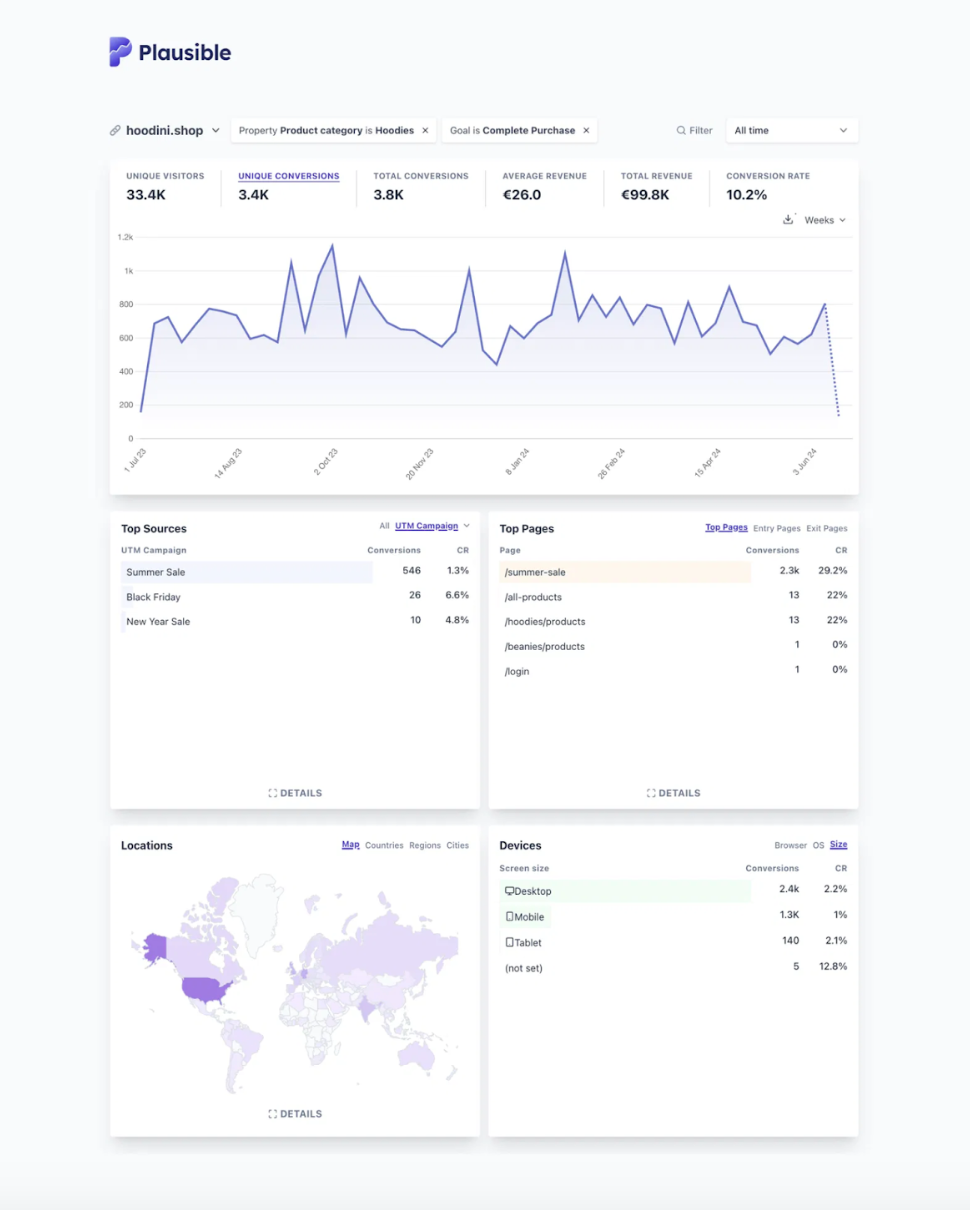
With this in place, filtering by the “complete purchase” goal and the “hoodies” product category shows every traffic source, campaign and page associated with those purchases. Toggle between UTM sources, mediums and campaigns to assess channel effectiveness. Toggle between top, entry and exit pages to find your best-performing content.
One practical advantage: because Plausible sits outside Shopify, your analytics stay consistent if you ever switch ecommerce platforms. The data and setup don’t change.
Frequently asked questions
Does Shopify have built-in analytics?
Yes. Shopify includes a customizable overview dashboard, detailed reports and Live View. Its main analytics features are available on every Shopify subscription plan. It is a capable source of truth for store and commerce performance, but it remains tied to Shopify.
Do I need Google Analytics for my Shopify store?
Not necessarily. Shopify already covers commerce reporting. Plausible can replace GA4 for merchants who want simple traffic, campaign and conversion analytics without cookies or personal data. GA4 is mainly useful when you need advanced custom explorations, BigQuery export or deep Google Ads integration.
Is Shopify Analytics accurate?
Shopify’s commerce data and browser-based traffic data have different limitations. Orders are recorded by the ecommerce platform, while Shopify says online store sessions are counted when visitors consent to cookies through your banner. That can reduce the traffic denominator available for session-based analysis.
Can I use Plausible Analytics with Shopify?
Yes. Add the Plausible script to your theme.liquid file and you have full web analytics running immediately. For ecommerce tracking (add to cart, checkout, purchases and revenue), Plausible provides a Shopify integration guide using a custom pixel in Shopify’s Customer Events system.
Can I replace Google Analytics with Plausible on Shopify?
For most Shopify merchants, yes. Plausible covers traffic sources, top pages, campaigns, conversions, revenue and funnels in one dashboard without cookies or personal data. Other services on your store may still require consent. Keep GA4 if you need BigQuery event export, advanced explorations or tightly integrated Google Ads attribution.
Does Plausible track ecommerce events on Shopify?
Yes. You can track add to cart, checkout started, payment info added and completed purchases, all with revenue attribution. Custom properties let you break down sales by product title, category or any other dimension you define.
Conclusion
Shopify Analytics is a capable commerce reporting system and should remain your source of truth for orders. It does not mean you need to accept the Google Analytics model for the rest of your measurement.
Plausible gives Shopify merchants a simpler privacy-first view of traffic, campaigns and conversions. It works across the store and the rest of your web presence without cookies or personal data.
Keep GA4 if BigQuery event export, advanced explorations or Google Ads integration are essential. Otherwise, Shopify plus Plausible is the clearer setup: commerce data where it belongs and independent web analytics you can understand without a reporting specialist.
Try Plausible free for 30 days or go straight to the Shopify integration guide to set up ecommerce tracking.